During a personalized 1:1 session with a SavvyFi Student Loan Coach, your dedicated coach will help you choose the best strategy for your specific loan situation, guide you in fixing loan or repayment plan issues (even if your loans are in default), and provide a roadmap to keep you on track.
Be sure to complete the following steps before scheduling your call:
- Sign up for SavvyFi with your email address or by entering your Promo Code.
- Link your student loans.
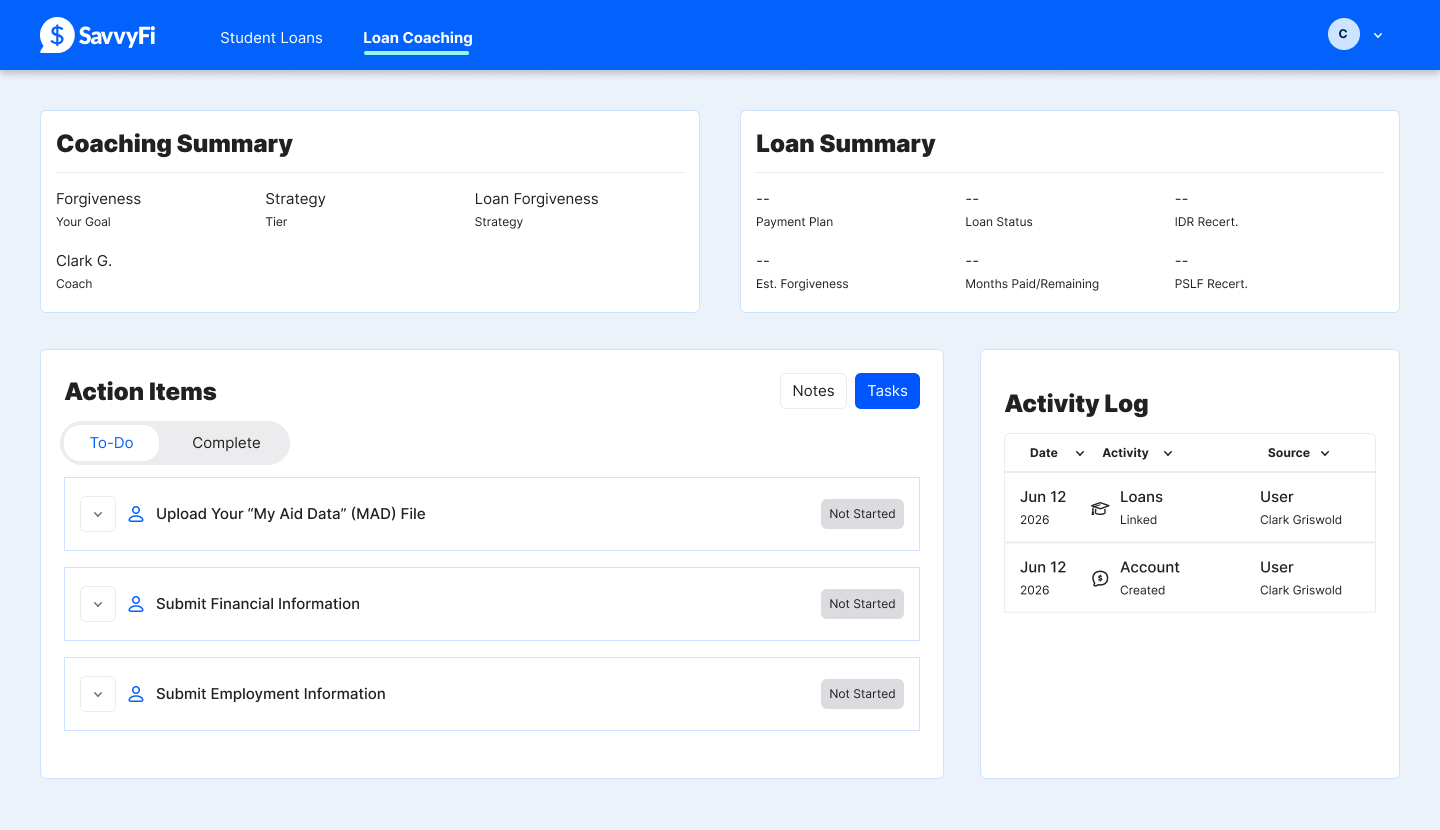
- Next, complete three tasks assigned to you on your Dashboard so that we can assess your unique situation.
- Upload your "My Aid Data" (MAD) file.
This file contains every detail realted to your federal student loans. You can find this by signing into your account on StudentAid.gov. Click here for step-by-step directions for downloading the file. - Provide your financial information, including your income reported on your taxes last year
- Submit details about your employment. This is particularly important if you might be eligible for Public Service Loan Forgiveness (PSLF) or Teacher Loan Forgiveness (TLF)
- Upload your "My Aid Data" (MAD) file.
Your Student Loan Coach can now complete an assessment.
Was this article helpful?
That’s Great!
Thank you for your feedback
Sorry! We couldn't be helpful
Thank you for your feedback
Feedback sent
We appreciate your effort and will try to fix the article