After linking your loans, you'll be asked to enter:
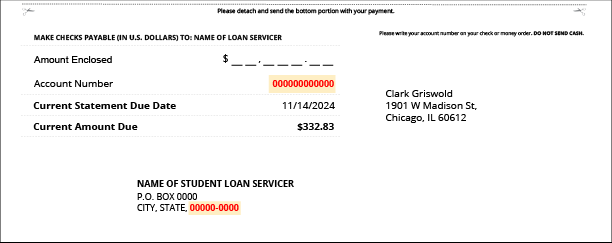
- Student Loan Account Number
- This ensures your payment is credited to the correct account. You’ll find this number on your loan statement. It's usually at the bottom on the remittance slip.
- Payment Zip Code
- This is found with the mailing address your loan servicer uses to receive payments. It’s typically listed on the remittance portion of your statement.
How to Send This Information Securely
For your privacy and security, please log into your SavvyFi account and contact Support directly from your dashboard. You’ll only need to provide this information once, and we’ll take care of the rest.
Questions? Reach out to support@savvyfi.co. We’re here to support you.
Was this article helpful?
That’s Great!
Thank you for your feedback
Sorry! We couldn't be helpful
Thank you for your feedback
Feedback sent
We appreciate your effort and will try to fix the article